 |
FaceGen
SDK Products
Integrate FaceGen technology into your software. |
|
|
FaceGen
SDK Products
Integrate FaceGen technology into your software. |
|
Both SDKs come with full C++20 source code and compile on Windows, MacOS, Linux, iOS and Android.
FaceGen SDKs have been licensed for games, avatars, marketing campaigns, university research, 3D authoring tools, face recognition training and medical visualization.
The Main SDK gives your end users all of the face controls seen in FaceGen Modeller so they can create and edit their own faces from scratch or edit faces from the PhotoFit. It includes tools for integration of custom mesh and UV layouts, and a tool for automatically rendering large numbers of random face images based on custom range settings.
FaceGen is designed so that animation morphs will automatically conform to any face you create.
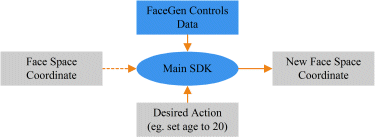
Faces are created or modified according to the various parametric controls, and represented by a 130-number coordinate vector in "face space" (these are the same numbers stored in a FaceGen FG file). In the controls step, the face is manipulated in face space:
In the construct step, a face space coordinate is used to construct a 3D textured model:
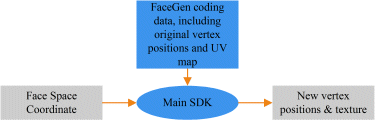
The construct step is repeated for every model which must fit seamlessly with the face; a hairstyle and glasses for instance.
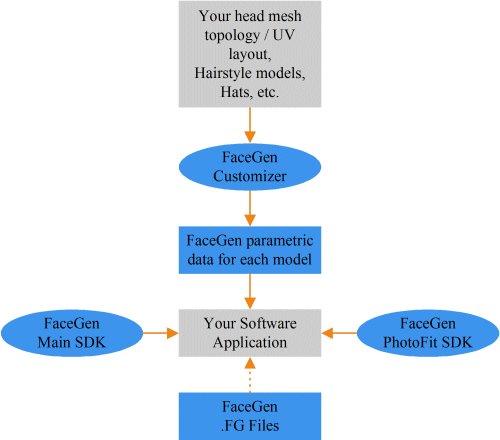
The output of the FaceGen construction stage is an updated list of vertex positions and/or a new texture image.
FaceGen shape statistics always leave the neck seam unchanged for seamless stitching to the body.
A skin colour texture can be generated for the torso or body, in order to create a seamless match.
If you prefer to put your hair, helmet, etc. into the head texture rather than a separate model, it can be composited directly onto FaceGen's skin-coloured output.
The vertex positions output from FaceGen can be used to update any kind of positional information. For instance, vertices can be used to define bone positions as well as polygonal vertices. Once the new vertex positions have been computed with FaceGen, they can be applied to your proprietary structure (polygonal, subdivision, bones, etc.) since the vertex ordering remains unchanged.
Information on related products.
The statistically derived face shape and coloring controls in the Main SDK are unique in the market. Here is a comparison with artistically created controls:
Our approach of fitting a 3D statistical model to a photograph is unique in the market. Other solutions use photo mapping, in which the final texture is a composite of the photographs. Here's how our approach compares:
The Main SDK comes with a full-source command-line tool for the automatic generation of random face images (or meshes), saved to files, with adjustable parameter ranges for pose, camera intrinsics, lighting, facial identity, facial expression and hairstyle. Corresponding CSV files can also be generated containing the projected coordinates of any desired points on the face. Many organizations have found this useful for generating training sets, and test sets which vary specific parameters.
We also have technology for reconstructing shape from depth / range cameras and dense 3D scan meshes.
Email us (partner@facegen.com) for documentation, API, pricing, and any questions.